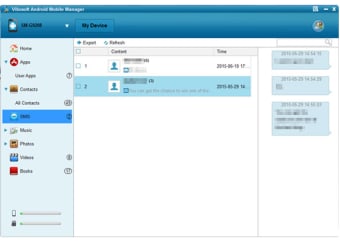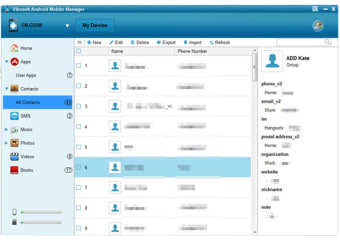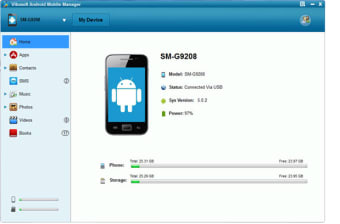
Managing files in your Android device is so much easier

Mobile devices have become better and more efficient in recent years. You do so much with them and install or download so many files. With that in mind, it can be difficult to sort through all of the files that you’ve accumulated over the years using just your phone. This is why it’s a good idea to manage your files from a PC so that you can have more security and flexibility when organizing your files. The Vibosoft Android Mobile Manager is a mobile manager that allows users to do just that. Using this software, you’ll be able to manage your mobile files with ease just by connecting your device to your PC. You can connect your device via USB or connect via Wi-Fi. It’s a powerful little tool that will undoubtedly make your Android experience so much better.


  • Pros

    • Easy to install Intuitive interface
    • Can be connected via USB or Wi-Fi
  • Cons

    • No help files available
    • Has typos and grammatical errors
 0/3

App specs

  • License

    Trial version

  • Version

    2.4.168
  • Latest update

  • Platform

    Windows

  • OS

    Windows 8.1

  • Language

    English

    Available languages

    • German
    • English
    • Spanish
    • French
    • Italian
    • Dutch
    • Polish
    • Portuguese
  • Downloads

    131.1K

    Last month's downloads

    • 8
  • Size

    5.20 MB

  • Developer

Program available in other languages


User reviews about Vibosoft Android Mobile Manager (Windows 8/7/XP)

3.8

9 reviews

Add review

Main reviews for you

  • Anonymous user

    Easy to use.. Actually, I have tried a lot of such Android mobile manager tools. Most of them have almost the same function:Transfer, Backup & Manager data on Android from computer,but I like this one more because it's easy to use.

  • Anonymous user

    Good android manager. Help me backup my Sony phone contacts to comptuer successful
  • Anonymous user

    Good android manager. Transferring music from my HTC phone to computer .It is a effectively and powerful android manager software.


  • Anonymous user

    I have used the trial version, works well on my Windows 10. I have used the trial version, works well on my Windows 10. Full functions need registered, worth to buy for managing sms and contacts

  • Anonymous user

    Limited to export. Copy all files to computerView data detail o PCLimited to export

  • Anonymous user

    Cool!. With this, I can send text messages from PC to other phones. Really cool.

More

You may also like

Alternatives to Vibosoft Android Mobile Manager (Windows 8/7/XP)

Explore Apps

Latest articles

Laws concerning the use of this software vary from country to country. We do not encourage or condone the use of this program if it is in violation of these laws.